

How to pay freelance translators and interpreters without paying twice
On this page
Paying linguists sounds like the easy part of running an agency. The work is done, the invoice is in, you send the money. Then pay day arrives: forty invoices across six currencies, three linguists who changed banks, two payment requests for the same job, and a colleague who isn't sure whether last week's batch went through.
Paying someone twice is more common than agencies admit. So is paying late, which costs you more in the long run, because good freelancers prioritise the agencies that pay on time and without fuss.
Here's a pay-run process that works whether you pay ten linguists a month or four hundred.
Decide how linguists can be paid
Start by deciding which payment methods you offer, rather than agreeing something different with every freelancer. The usual options:
- Domestic bank transfer for linguists in your own country. Cheap and simple.
- International transfer through a payments provider such as Wise or Airwallex, for linguists abroad. These usually cost less than a traditional international bank transfer and let you pay in the linguist's own currency.
- PayPal, which some freelancers prefer, particularly in countries where receiving international bank transfers is awkward.
- Cheque or other local methods, if you still have linguists who need them.
Decide who bears the fees, and say so in your terms with linguists. Compare providers on the total cost of your typical payments, meaning the fee plus the exchange rate you actually get, not on the headline fee alone.
Collect payment details once, and properly
Most failed payments come from incomplete or out-of-date bank details. Ask for exactly what each method needs when the linguist joins, not on pay day:
| Paying into | What you need |
|---|---|
| A UK bank account | Account holder name, 6-digit sort code, 8-digit account number |
| A US bank account | Account holder name, 9-digit ABA routing number, account number, account type |
| An account in Europe | Account holder name, IBAN, and usually the BIC/SWIFT code |
| An account elsewhere | Account holder name, account number, SWIFT/BIC code, bank name and address |
| PayPal | The email address of the linguist's PayPal account |
The account holder's name and full address matter more than people think: an international transfer can be held or returned when they're missing or don't match the account.
Two habits prevent a lot of trouble. First, let linguists keep their own details up to date in a portal, so the latest details are always the ones you pay to. Second, never accept a change of bank details by email alone. Confirm it through a second channel, such as a phone call to a number you already hold. Changed bank details are the oldest trick in invoice fraud.
Approve before you pay
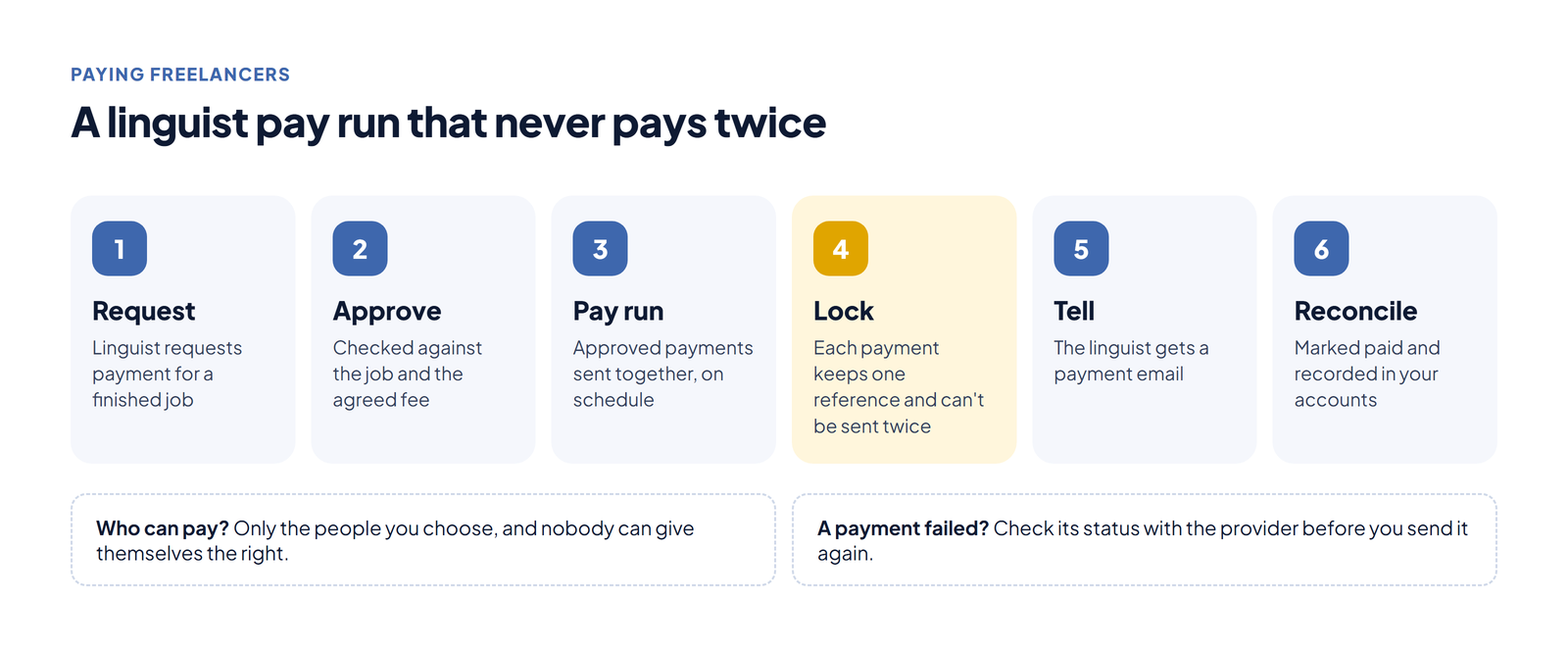
Every payment should trace back to work that was delivered and agreed. That means a payment request or invoice tied to a specific job, checked against the fee you agreed and, for interpreting, an approved timesheet.
Approval and payment are different steps, and it helps to keep them separate. A project manager knows whether the job was done well; someone in accounts decides when the money goes out. If a job is paid in stages, the stages should never add up to more than the agreed total. Your system should enforce that, not a spreadsheet.
Pay in runs, on a schedule
Paying linguists one by one, whenever someone asks, is how mistakes happen. Choose a rhythm (weekly, fortnightly or monthly) and tell linguists what it is. Then pay everything approved since the last run, in one go.
Runs are faster and safer:
- you check one list instead of forty emails;
- the payments go out together, so it's obvious what has and hasn't been paid;
- with providers that support batches, you approve the whole run once.
In LinguisTriks, for example, you can tick the approved payments and send them to Wise as one batch, then approve the batch once in your Wise account. Airwallex and PayPal payments go from the same approval list.
Make it impossible to pay twice
Double payments usually happen in one of three ways: two people pay the same request, someone retries a payment that looked as if it had failed but hadn't, or a payment is made by hand outside the system and nobody marks it.
The defences are simple to describe and worth insisting on:
- One reference per payment, kept for its whole life. If a payment is retried, it goes out with the same reference, so the provider can recognise it as a duplicate.
- Lock a payment once it's sent. A payment that is on its way can't be paid again from any button, however impatient someone is.
- Check before you retry. When a provider doesn't answer clearly, find out what happened before you send it again.
- Limit who can pay. Only the people you choose should be able to release payments, and nobody should be able to give themselves that right.
A good system does all four for you. If yours doesn't, write down who pays, when, and how they check, and follow it every time.
Tell the linguist, and reconcile
When the money leaves, tell the linguist: which jobs it covers, the amount and the reference. It saves a stream of "has my payment gone?" emails, and it's a courtesy freelancers remember.
Then reconcile. Mark each payment as paid against its job, and record it in your accounts. If your agency uses Xero, linguist bills and payments can be synced to it rather than typed in again.
Paperwork and tax
Keep the linguist's invoice or payment request, the approval and the payment confirmation together, so anyone can answer "why did we pay this?" a year later.
The rules on freelancer status, tax forms and VAT differ by country, and they change. Agree with your accountant which forms you need from linguists in each country you pay into, and collect them when the linguist joins, alongside their bank details.
A pay-run checklist
- Payment methods and who pays the fees agreed in your terms with linguists
- Bank or PayPal details complete before the first job
- Changes to bank details confirmed by a second channel
- Every payment linked to an approved job, timesheet or invoice
- Payments made in a regular run, not on request
- One reference per payment, and payments locked once sent
- Only named people can release payments
- Linguists told when they've been paid
- Payments reconciled and recorded in your accounts
Linguist payouts in LinguisTriks follow this process from the approval list, through Wise, Airwallex or PayPal, with protection against paying twice.
Frequently asked questions
What's the cheapest way to pay freelance translators abroad?
It depends on the currency and the country. Compare the total cost of your usual payments, meaning the fee plus the exchange rate you actually get, across your bank, Wise, Airwallex and PayPal, and choose a default method for each currency.
How do I avoid paying a linguist twice?
Keep one reference per payment for its whole life, lock a payment once it's sent, check the status with the provider before retrying anything, and limit who can release payments.
What bank details do I need to pay someone abroad?
The account holder's full name and address, the account number or IBAN, and the bank's SWIFT/BIC code. For a UK account you need the sort code and account number, and for a US account the routing number and account number.
How often should we pay freelancers?
On a fixed schedule they know, such as weekly, fortnightly or monthly. Regular runs reduce mistakes, and freelancers prioritise agencies that pay on time.
Should we accept bank detail changes by email?
Not on their own. Confirm any change through a second channel, such as a phone call to a number you already hold, because changed bank details are a common route for invoice fraud.
Related articles
TMS vs TBMS vs CAT tool: which software does a translation agency need?
A CAT tool helps a linguist translate the text, using translation memory and a termbase. A translation management system (TMS) runs the translation workflow: files, tasks, connectors and automation. A translation business management system (TBMS) runs the agency itself: clients, quotes, jobs, freelancers, invoices and payments. Most agencies need a CAT tool for their linguists and a TBMS for the business; a TMS earns its place when clients send a constant stream of content to localise.
Read article
How to price translation services: a margin model for agencies
Price translation from what a job really costs you - the translator, revision, project management time, certification and payment fees - then add the margin you need and express it as a rate the client understands. Charge per word for most documents, per document for certificates and short standard documents, per hour for editing and DTP, and always set a minimum charge.
Read article
Interpreter cancellation policy: a template for agencies
A good interpreter cancellation policy sets notice periods and fees (for example, free with 48 hours' notice, half the fee inside 48 hours and the full fee inside 24 hours), says what the interpreter is paid, covers no-shows on both sides and remote sessions, and is agreed in writing before the first booking. The template below is a starting point to adapt with your own terms and legal advice.
Read article